Finish the tutorial
The game starts you in a scripted tutorial and does not hand over the lot until it ends. In the recording this site read, the tutorial ran from about 0:47 to 1:41, and the player only started arranging trees afterwards.
You are not choosing anything during this part. Let it finish, then look around: the Lot Manager is the kiosk on your lot, and the HUD in the top right already shows CASH, REPUTATION and LOT STATUS.
Order your first crate
Open the Lot Manager and pick Tree Supplier. A green RECOMMENDED ORDER block sits at the top with an ADD TO ORDER button next to it. In the session this site read, the recommendation was 8 Swiss Stone Pine, 6 European Silver Fir and 4 Siberian Fir — 18 trees for $651.
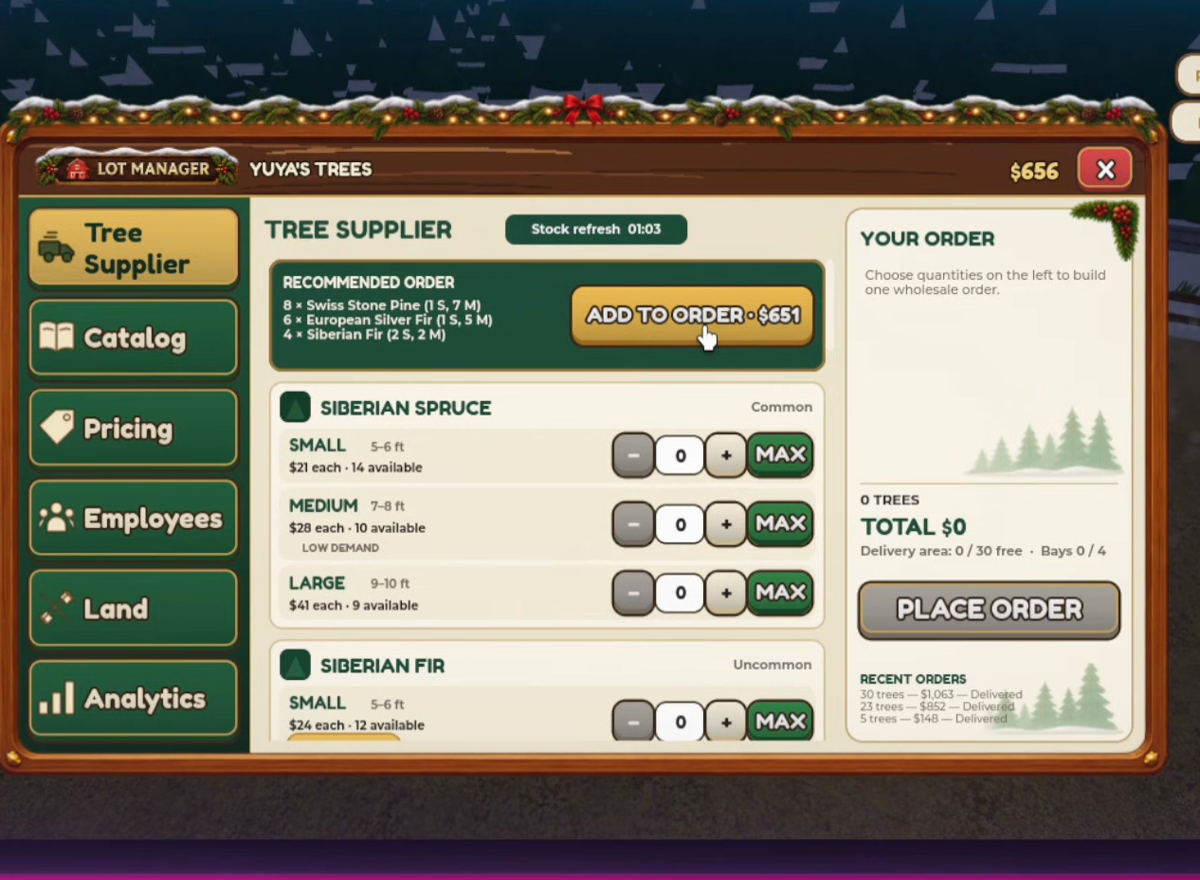
That was one session's suggestion, not what every player is offered. Read the row prices before you accept it, then compare with the table in Run a Christmas Tree Lot Tree Prices.
Press PLACE ORDER and check two lines on the panel: Delivery area, which shows how many of your slots the crate will use, and Est. delivery, which read 00:35 in the recordings.
Place trees before you open
The truck arrives in one crate at the receiving area. While trees are unplaced, the HUD reads LOT STATUS CLOSED, which is the game telling you the lot is not trading yet.
Walk each tree from the crate to a spot on the lot. The layout does not need to be pretty on day one — one straight line down the middle is enough to start, and Run a Christmas Tree Lot Layout Ideas has three plans for when you want more.
Open the lot when the trees are out. The status line switches to OPEN.
Sell the first tree yourself
A customer walks in, picks a tree, and then needs someone at the register. That someone is you. Stand at the booth and take the payment; the CASH counter moves, and a short review message usually appears: Beautiful tree and great service! or Quick and friendly. Merry Christmas!.
Do this for a full crate before you buy anything. You are learning the pace: how long a customer takes, where they queue, how often the shelf empties.
Spend the first $1,200
Open Employees. Two hires are listed, and only two seats exist at the start.
- If customers queue at the register while you are restocking, buy the
HIRE $1,200cashier. - If trees sit in the crate or a customer waits to be loaded, save for the
HIRE $1,800lot worker. - If neither queue forms yet, buy neither. Order the next crate instead.
That third option is real. A hire with nothing to do is a crate you did not buy. Run a Christmas Tree Lot Workers goes through the three cases with the panel wording.
Set your first evening target
Three things are worth watching before you log off:
- Which rows carried a
HIGH DEMANDbadge while you played, and whether your crate matched them. - How many times the shelf went empty. If it happened more than twice, storage is your first upgrade.
- What your cash looks like after buying a second crate, not after the first sale.
Run a Christmas Tree Lot Money Guide turns those observations into the one bottleneck worth fixing next.
If the lot will not open
Trees still in the crate keep the lot closed. Walk to the receiving area and place everything you ordered, then reopen. If a tree will not place, try another spot on bare ground rather than on a path or against a fence.
If the crate has not arrived, read the Est. delivery line on the order panel — it counts down, and 35 seconds is normal. If CASH is too low for another crate, sell what is on the lot first; the HUD never hides that number.